Bring the spec sheet your products already live on, tell Bettr how it is written once, and fill the gaps in your catalog without retyping them.
On this page
Was this helpful?
Real help from real food people
Chef Diego runs a real food plant. If this page didn't get you there, tell us — a person reads every message.
The facts a customer asks you for — the ingredient statement, the unit and case
barcodes, how many go in a case, what the case weighs — are already written
down. They're on the spec sheet you send that customer, on the line sheet a
broker sent you, on the workbook somebody keeps for the retail account. Your
product records are the one place they aren't. Filling those holes by hand is a
week nobody has, so bring the file instead: Bettr reads it, shows you what it
would write and onto which records, and writes only what the file actually
carried. Start at
Import products,
from Import at the top of Products.
Nothing lands until you have seen what it says. That's the shape of the whole
thing: the file is read, you check what it would do, and only then does anything
reach a record.
Bring the file in
1
Open Products and select Import
Import sits between Sync all with Odoo and New at the top of
Products. It
opens on a drop zone, a Read it through picker, and every import this
company has run before.
2
Choose the file
Drop it on the box, or select it. Bettr takes an Excel workbook (.xlsx or
.xlsm) or a CSV, up to 25MB, and you can bring several at once when the
products are split across files.
3
Say how it should be read
The first time, leave Read it through on Read it for me — Bettr reads
the file and proposes what each tab and column means. Once you have saved a
, pick it
here and the file goes straight to the check.
4
Select Read the file
Reading happens in the background, so a long list doesn't tie up the screen.
A progress bar says which stage it's on, and the page moves on by itself when
it's done.
Past imports sits under the drop zone: the file each came from, when it
arrived, the setup it was read through — or Read for you where nobody had
saved one yet — how many products it carried, and where it got to. Landed
means it's in. Checked, not landed means it's waiting on you. An import
somebody walked away from picks up where it stopped when you select it.
Tell Bettr how the sheet is written
Map the file puts the sheet's own rows on top and Bettr's reading of them
below. Nothing lands from this screen. It exists so a wrong reading gets caught
while it is still a reading.
1
Check what each tab is
Every tab wears what Bettr made of it — A list of products, Skip this
tab, or What is this tab? in the warning colour where it would not
guess. A tab read on terms of its own also wears Its own way. Select a
tab to open it; This tab is changes it. A price list or a shipping log
belongs on Skip this tab.
2
Check what each column means
Over the file's own rows sits one picker per column: Product code,
Product name, Description, Ingredient list, Unit barcode,
Case barcode, Units per case, Net weight per case, Weight
unit, Case type, Cases per pallet, Case description, Width,
Length, Height, Dimension unit, or Skip this column. A column
Bettr could not name reads What is this column? in the warning colour,
and a line above the grid says which letters they are —
Columns D, E we could not name. Nothing in them travels until you say what
they are. Bettr reads a misspelled heading and a doubled space the same as
the tidy version, and still refuses to guess at a heading that could mean two
things.
3
Check which row the list starts on
Under the tab's name Bettr reports what it settled on — One product per row,
read from row 2 down. — and tints the heading row it found in the grid
below. A title line, a blank row, or a company logo above the headings is
normal, and the reading moves past it. On a tab read like the rest, the
headings are the thing to correct if the tinted row is wrong: Bettr finds the
row by the words you name the columns after.
4
Say when a tab is written differently
Those pickers speak for every tab read the same way — Every tab read as a
list of products shares these columns. The tab somebody else typed, with
its table at the top of the sheet and its own words over it, gets a reading
of its own instead. This tab reads differently gives it one; from then on
it wears Its own way beside its name in the tab list, and nothing you say
on it touches the other tabs. Read it like the rest puts it back. So does
Skip this tab, which drops the tab from the reading and forgets its own
reading with it — the badge goes, and so does the tab's place in the count
the check reports. If a setup still holds a reading for a tab nothing reads,
that tab says so: Nothing on this tab is read, and we still remember a
reading of its own for it from before.Forget that reading clears it.
A tab reading its own way says where its headings are. When they are words
Bettr already knows, it reports the row it found them on — Its headings are
on row 1, found by the words this tab writes them in. When they are not,
Its headings are on lists the file's own rows — Row 1 · SKU · ITEM ·
INGREDIENTS · RETAIL UPC — and you point at the right one, then name its
columns above the grid as usual.
5
Save it, or carry on
Save this mapping as takes a name — Customer spec sheet, Broker
line sheet — and Save setup keeps it for every file of that shape after
this one. Continue goes to the check without saving a name. Either way
Bettr reads the file again through what you just said, from the copy it
already holds: correcting a mapping never means uploading again.
Once you have corrected something, the line under the name says where your
answer is going — Continue reads this file only — name it to keep what you
just said. with the box empty, Saving teaches "Customer spec sheet" what
you just said. when it is the setup this file came in through, and
Saving keeps this reading as "Broker line sheet" for the next file like
it. for a name you have not used before.
One picker per column, sitting above the sheet's own rows: Ingridient Statement read as Ingredient list all the same, and two columns Bettr would not name left as the questions they are.
A workbook that disagrees with itself
A spec workbook that grew by hand over years rarely agrees with itself. The
headings sit on row 3 on one tab and row 1 on the next. The line that came over
with the company you bought kept its own sheet, and it calls a code SKU where
every other tab says ITEM CODE. Bettr reads a tab that stands apart on its
own terms and shows you what it made of it; a column it still cannot name waits
as What is this column? rather than being guessed.
The tab another office typed, read on its own terms — its own header row, its own columns, and the way back to the reading the rest of the workbook shares.
A setup keeps both: the one reading every tab shares, and each odd tab's own,
remembered under the name written on that tab. Bring the same workbook back
through it and the mapping screen never opens — the check says 3 tabs, one of
them read its own way, 4 rows, and everything is already read the way you
said. Answer a workbook's mess once and it stays answered, however many tabs it
takes.
Offices rename tabs, though, and a tab remembered under a name the file no longer
writes would come in short with nothing said about it. So the check owns up to a
tab it took nothing from and holds the landing shut — Nothing in this setup
says what the tab "LISTA FEBRERO" of february-spec-sheet.xlsx is, so nothing came
in from it. Map it again and say what that tab is, or skip it. A tab it does
read as a list of products, but finds none of its columns on, is named the same
way: None of the columns this setup reads are on the tab "LISTA FEBRERO" of
february-spec-sheet.xlsx, so no products came in from it. Map it again and give
that tab a reading of its own, or skip it.
Map it again is where you answer either one, and each tab opens on its own
question. A tab nothing speaks for wears What is this tab?, exactly as one
nobody has ever seen does. A tab already read as a list of products keeps
that answer and shows what is missing instead — We can find none of these
columns on this tab, so nothing would be read from it. If it is written its own
way, say so and give it its own reading.This tab reads differently gives
it one; Skip this tab leaves the tab out.
Check what it will do
Check the import is the screen the whole thing exists for. It says what would
be written, row by row, before anything is.
Across the top is the split: how many are new products, born here, with no
storage type until you set one in Products; how many are updating records you
hold, where only the fields this file carries change; and how many are
already right, because your records already say all of this. A row that
changes nothing writes nothing.
The split, declared before anything lands: one product born here, two records being filled in, one the catalog already agrees with.
Each row underneath says the same thing in full — New product, Updates
Master Marinade, or Already right — Teriyaki Sauce says all of this — with
the code the file carried, the tab and row it came from, and, where it is
writing, exactly which fields: Writes Ingredient list, Unit barcode, Case
barcode.
A row finds the record you already hold by the code or the name the file itself
carries, never by anything internal to Bettr. When that lands on the wrong
record, Bring it in as a new product instead and It is a product you hold
move it either way, and the split moves with it. Leave it out drops the row
from what lands.
Answer what Bettr will not guess
A row Bettr cannot settle says so where the row is, and holds the whole import
shut until somebody answers it. The ones you'll meet most:
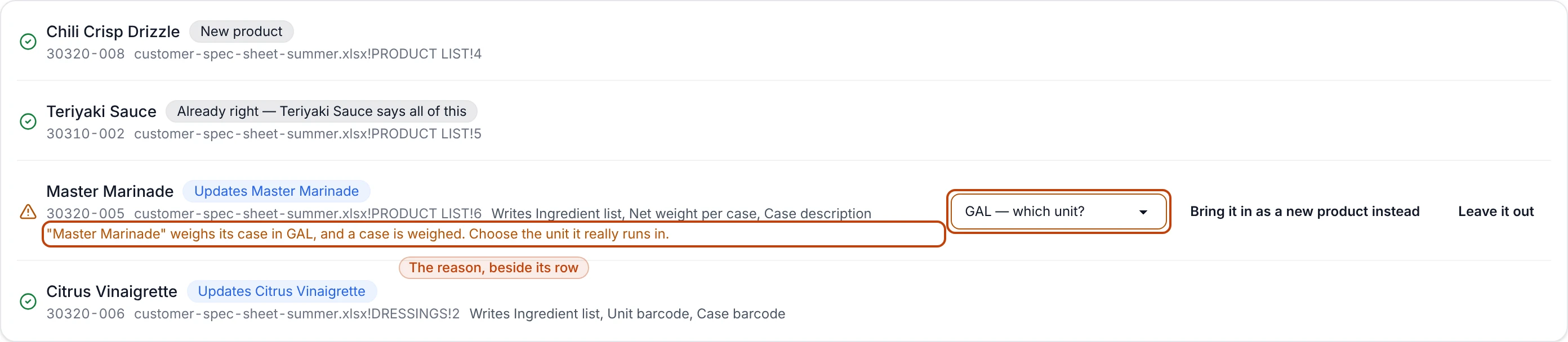
A case weighed in something that isn't a weight."Master Marinade" weighs
its case in GAL, and a case is weighed. Choose the unit it really runs in. The
picker reads GAL — which unit? and lists the units you keep. A volume is
never converted behind your back: a gallon of oil and a gallon of vinegar are
not the same weight, and only your floor knows which one this is.
A number that isn't one. A units-per-case of 12 ct, a case weight of
n/a, a pallet count written with a decimal — each names the row, the field
and the cell, and asks you to fix it in the file.
A case type Bettr doesn't keep.ships in "shipper", which is not a case
type we keep. Write box, pallet, bag, roll or other in the file, or map that
column to Skip.
A row wearing its own reason: the marinade's case is written in gallons, so its unit picker sits beside it and the landing stays shut.
Some questions aren't yours to answer at the check, and Bettr says so rather than
picking one:
A file that contradicts itself comes back to you
The same code on two rows, the same name on two rows, or a code your catalog
itself holds on more than one product — each stops the whole import and names
what to fix. Correct the file, or settle the codes in Products, and bring it
back. A door that quietly picked one of the two would write a customer's
ingredient statement onto the wrong product.
The button at the bottom wears the reason it's off. Once everything is settled it
reads plainly instead: Everything above lands in your catalog. Nothing else on
those records changes.
What a product born here arrives as
A product file has no column for where a product is stored, so a product this
door brings in arrives with no storage type at all, and the split says so before
it lands. Nothing is guessed for it: a machine picking Dry for something that
belongs in the freezer would read on the record as a decision somebody made.
Open it from What arrived and set its storage on the product page.
Everything else a new product needs and no spec sheet carries — its category, its
price, its allergens — starts empty for the same reason. The import gets the
product onto the shelf with the facts the file actually had.
A record keeps everything the file didn't mention
Updating is an overlay, not a replacement. A two-column sheet of codes and
ingredient statements fills in those statements and touches nothing else — the
allergens, the storage, the cost and the stock levels on that record are
exactly as they were.
Land it
Land these products takes the import in. What arrived then lists every
product that landed with the code it carried, each one a link to the product
itself, with Import another file and Go to products beneath. From there
Edit a product and attach documents
is the same walk it is for a product somebody typed.
Anyone set to hear about product updates hears this landing once — An import
updated 3 products, named after the file it came from and opening on this same
What arrived list. A file that fills forty records is one arrival, not forty
separate changes, and somebody editing a single product still sends the notice
they always did. Notifications reference
covers the events and who they reach.
Filling an ingredient statement here is often the last thing standing between a
recipe and a signed-off spec sheet: a sheet that named the record with the hole
in it compiles the moment the statement arrives. See
Approve and print a product spec sheet.
Bring the same sheet back and nothing happens twice
Drop a file you've already taken in and every row reads already right, naming
the record that holds it. Bettr compares what the file says against what each
record says now, so a sheet that hasn't changed writes nothing however many times
it comes through.
Change one ingredient statement in that file and the same file writes exactly
that one field, on the one record it belongs to. That's what makes this safe to
use as a habit: the sheet on your shared drive stays the sheet your office edits,
and bringing it back is how the change reaches Bettr.
Change your mind about the mapping
Map it again on the check goes back to the mapping screen with the file Bettr
already holds. Say it differently, save, and the same stored file is read again
through the new reading — no second upload and no second copy of the file.
Throw an import away
Throw this import away discards the whole thing: nothing landed from it, and
nothing will. Everything you told Bettr on that screen goes with it, and the
import leaves Past imports. The file itself is untouched — bring it back once
it's fixed.
Forget beside a saved setup on the import screen retires that layout: it
leaves the Read it through picker and the Saved setups list, and the
imports that were read through it keep their record of it.