Keep one list of the totes, racks and pallets your floor counts finished output in, and pick the ones each recipe arrives in.
On this page
Was this helpful?
Real help from real food people
Chef Diego runs a real food plant. If this page didn't get you there, tell us — a person reads every message.
A count off the line never arrives as a number of bowls. It arrives as eleven
totes, four racks and seven loose ones, and the person writing it down has to
know what a tote holds before any of it means anything. Bettr Manager keeps that
list once, for the whole company, in
Count levels
under Settings — and every recipe picks the levels its own output arrives in.
Name a level
1
Open Count levels
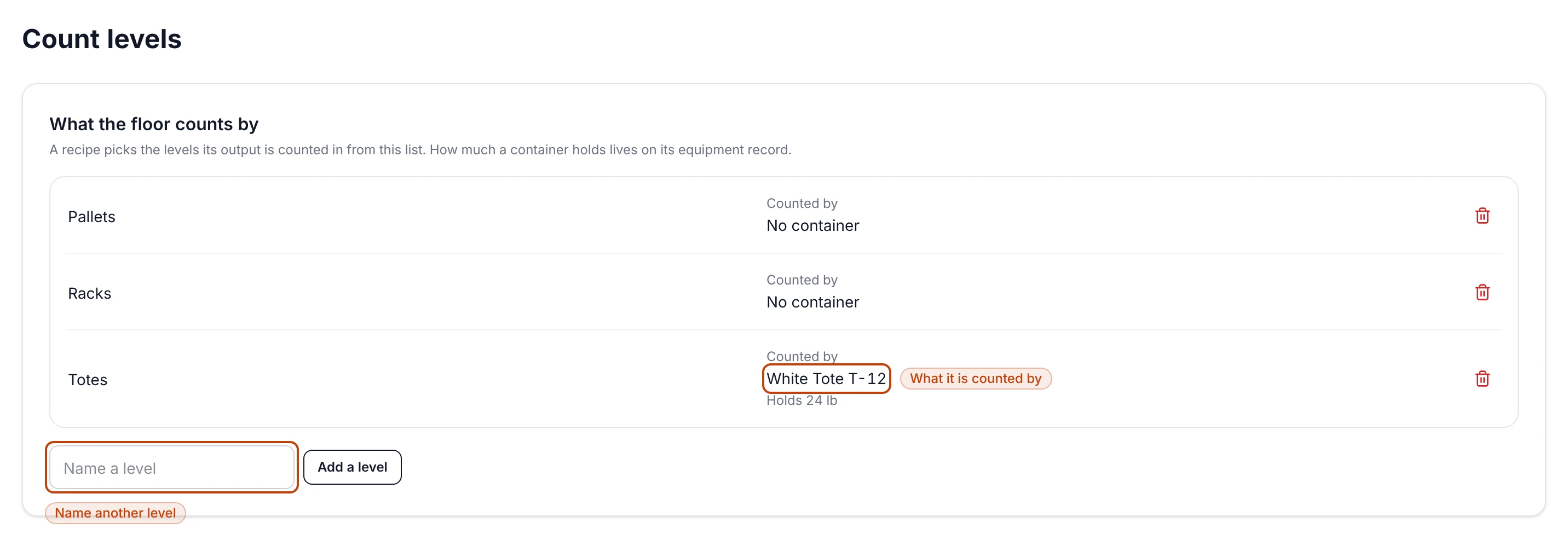
Open Settings → Count levels. The card What the floor counts by holds
the list. A company that hasn't named one yet reads No count levels yet.
2
Type the name and add it
Type it into the field beside Add a level — Totes, Racks,
Pallets, whatever your floor says out loud — and select Add a level.
It joins the list in alphabetical order.
The names are yours to write; there's no fixed list to pick from. Bettr Manager
refuses a blank one — Name the level — and refuses a name the company already
carries, in any capitalization — Totes is already on the list.
Say which container a level is counted by
A level can name the container it's counted by. Select Counted by on the
level's row and pick from your containers; the list also offers No container,
which is the right answer for a level like Pallets that isn't a piece of
equipment you registered. The pick saves as soon as you make it.
Under the container, the row says how much it holds — Holds 24 lb. That
number isn't typed here. It's read from the container's equipment record, so it
lives in one place and every recipe counted in that level reads the same figure.
A container nobody has typed a capacity for reads No capacity on its equipment
record.
To type it, open
Equipment, open
the container and select Edit. On a container the capacity field reads How
many fit, and the detail page shows it under Type & capacity.
Count levels: three levels the floor counts by, with the container one of them is counted by and how much it holds.
Rename or take a level off
Both happen on the row. Select a level's name to type over it — Enter commits
it, and so does clicking away. To take one off, select the trash icon at the end
of its row. It goes right away, with nothing to confirm, and stops being offered
on recipes.
A level you take off can come back
Add a level again under the same name and it comes back as the level it was,
still chosen on every recipe that had chosen it. So taking off a level your
floor stopped counting by is safe, and reversible if that changes.
Pick the levels a recipe is counted in
1
Open the recipe's run configuration
From Recipes,
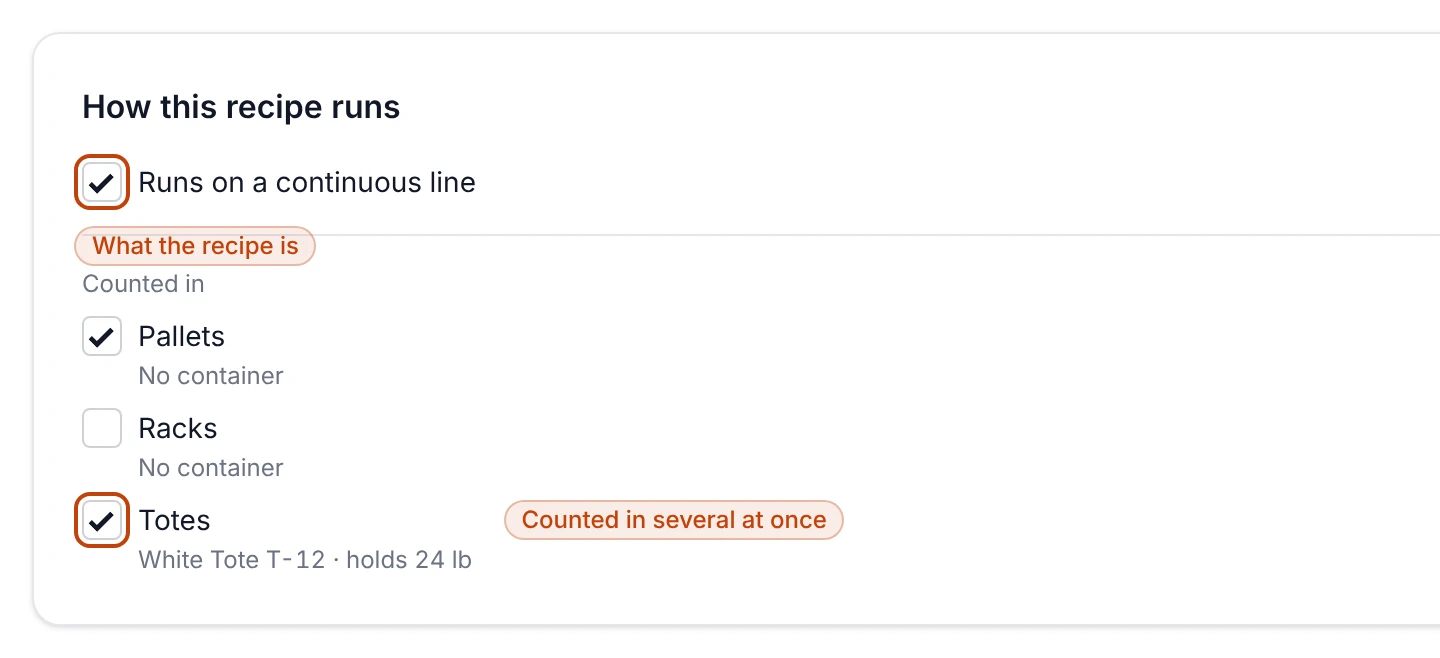
open the recipe and select Run configuration. The first card, How this
recipe runs, is where the recipe says what it is.
2
Say whether it runs on a continuous line
Tick Runs on a continuous line for a recipe that comes off a line rather
than out of a batch. It saves as you tick it.
3
Tick every level its output arrives in
Under Counted in, tick each level the floor counts this recipe's output
by — several at once is the normal case, because a real count arrives as
totes and pallets in the same breath. Each level shows its container and
capacity underneath, so you can see what you're counting in.
A recipe whose company hasn't named any levels yet reads Name the levels this
plant counts by on Count levels, with a link straight to the list.
How this recipe runs: the continuous-line tick, and the levels this recipe's output is counted in.
Run configuration belongs to the recipe rather than to one version of it — the
page says the same on every version under the recipe's name. Changing what a
recipe is counted in doesn't start a new version and doesn't touch a sign-off.
Taking a level off doesn't rewrite the recipes that named it
A recipe that was counted in a level you've since taken off still shows it,
marked No longer on the count-level list, so nothing changes under a recipe
quietly. Untick it there when you want that recipe to let it go.
What the levels are, and what they aren't
The list is the record of what your floor counts by — what a level is called, and
what container it's counted by. Recording what a run actually produced is a
different thing: that happens on the run, through the Packaging groups
further down the same run-configuration page, which say how many units travel
together when the floor packs the recipe.
Count levels belong to the company
Each company you run keeps its own list, so a level named in one company is never
offered in another. Anyone who can open Settings can keep the list; choosing
a recipe's levels takes the same permission as editing any recipe.