Name the language your recipe steps are written in, add the other languages your crew reads, and let one step carry a version in each.
On this page
Was this helpful?
Real help from real food people
Chef Diego runs a real food plant. If this page didn't get you there, tell us — a person reads every message.
Half your crew reads Spanish, the steps are typed in English, and somewhere
there's a translated sheet somebody made once that nobody has updated since. Bettr
Manager keeps one step and lets it carry a version in each language your floor
reads, so the translation moves when the recipe does. You name those languages in
Languages, under
Settings.
Name the language your steps are written in
The top card, Recipe steps are written in, holds the language a step is typed
in first. It reads English until you change it. Select the word, type over it,
and press Enter or click away — there's no save button.
Changing it renames the language your steps are already in. It doesn't translate
anything and it doesn't touch a word anyone has written: if you set it to
American English, every step still says exactly what it said, and the switch
on a recipe now calls that language American English.
Add a language your crew reads
1
Open Languages
In the sidebar, open Settings → Languages. Under the written-in card,
Also spoken on the floor lists the other languages your company reads. A
company that hasn't added one yet reads No other languages yet.
2
Type the name and add it
Type the language into the field beside Add a language — Spanish,
Portuguese, Haitian Creole, whatever your crew actually reads — and
select Add a language. It joins the list in alphabetical order.
The name is yours to write; Bettr Manager doesn't hold a fixed list of languages
to pick from. It refuses a name the company already carries, in any
capitalization — Spanish is already on the list — and it refuses the language
your steps are written in, because that one is already there as the written-in
language.
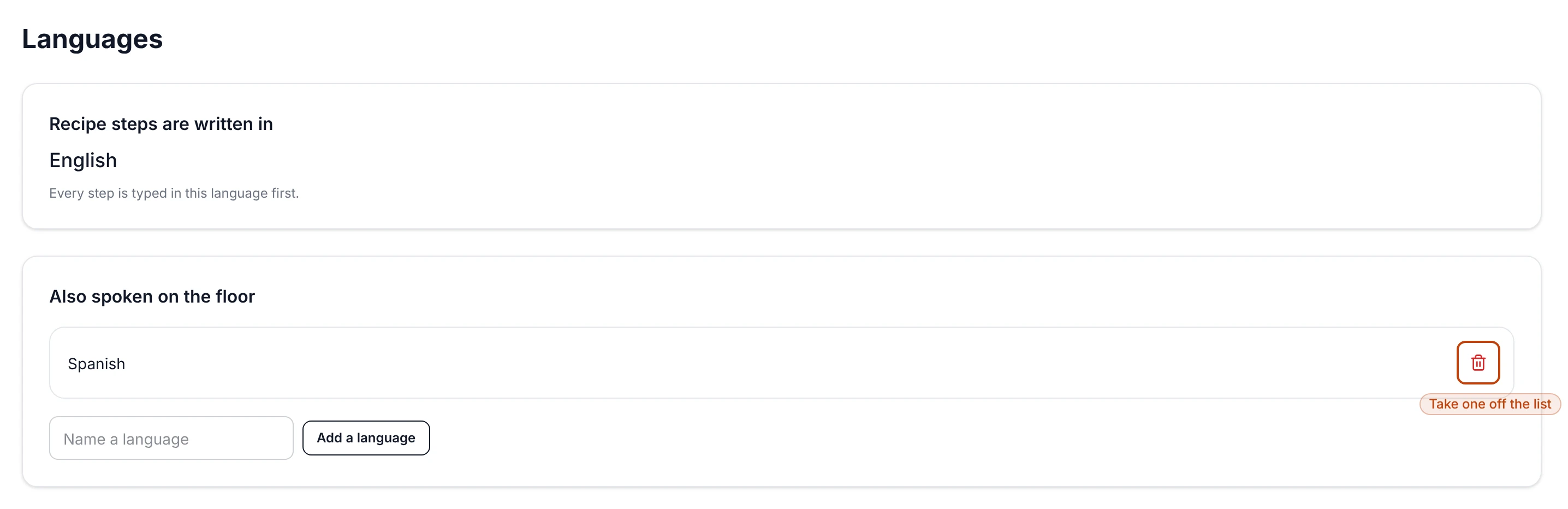
Languages: the one language steps are typed in, above the other languages the floor reads.
Rename or remove a language
Both happen on the row. Select a language's name to type over it, the same way
as the written-in card. To take one off, select the trash icon at the end of its
row — it goes right away, with nothing to confirm, and it stops being offered on
recipes.
Taking a language off doesn't lose the words
Add a language back under the same name and every step instruction written in it
comes back with it. So removing a language your floor stopped using is safe, and
reversible if that changes.
Read a recipe's steps in a language
The list you keep here is what a recipe's steps offer.
1
Open a recipe's steps
From Recipes,
open the recipe and select Steps. Beside the How the batch is made
heading, Reading in holds the written-in language and every language on
your list.
2
Switch to the language you want
Pick it, and each step shows what it says in that language. A step nobody has
written in it yet reads No Spanish yet where the instruction goes.
3
Type the instruction in place
Select the step's instruction and type it in that language. Enter commits it,
and so does clicking away. What's underneath in your written-in language is
untouched — it's one step carrying two sets of words, not two steps drifting
apart.
The printed sheet follows the switch. Print while the page is showing Spanish and
the sheet comes out in Spanish, with the same equipment, sizes, temperatures and
durations beside each step.
Ask for a machine draft
On a draft version, switching to one of your languages puts a Draft in Spanish
button beside the switch. It asks a machine translator for a first pass at every
step in that recipe at once.
What comes back is a draft and stays a draft. Each one lands in the cell of a step
that has nothing written in that language yet, marked Draft, not saved. Nothing
is recorded on the recipe until a person edits the cell and commits it — read it,
fix what the machine got wrong about your plant's words, and the badge goes. A step
that already carries a translation is left alone.
A badge beside the button says where the request stands: Drafting while it's
out, Drafts ready when the drafts are in the cells, The translator refused
it, Stuck when nothing came back and nothing is still trying, or Nothing
drafted with the reason — most often that machine translation isn't switched on
for your installation, in which case you write the translation yourself in the
step.
A draft prints like anything else on the page
The printed sheet is the page as it stands, so a machine draft you haven't edited
yet prints with the rest — and the Draft, not saved mark doesn't print beside
it. Work through the drafted steps before you print for the floor.
Languages belong to the company
Languages are a company setting, so each company you run keeps its own list, its
own written-in language, and its own translations. Everyone who can open Settings
can keep the list; writing a step's translation takes the same permission as
editing any recipe.